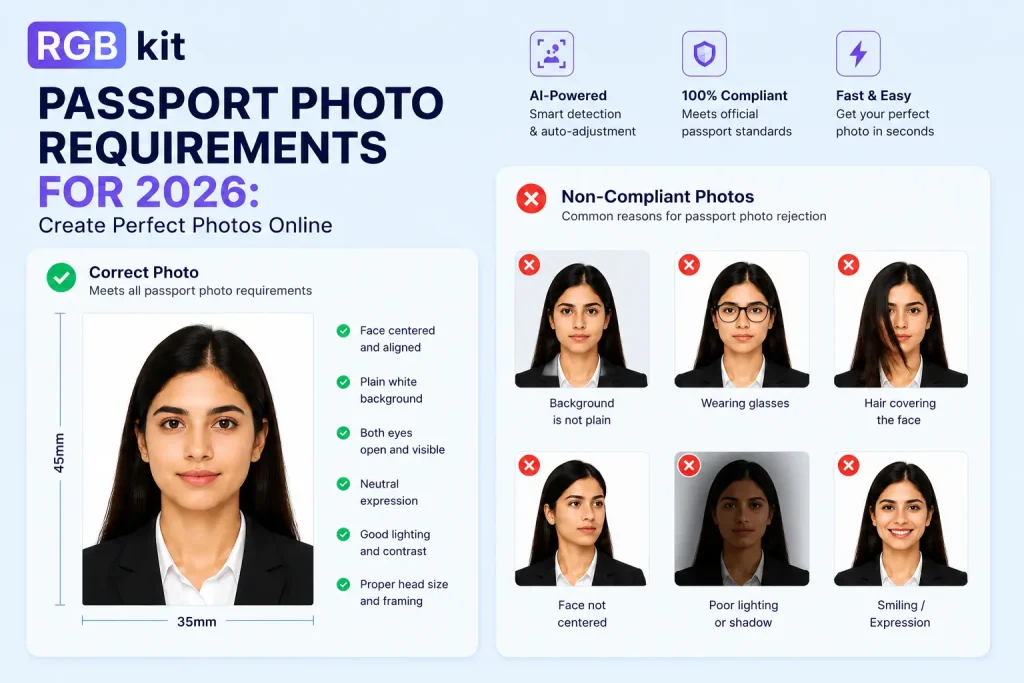
A passport size photograph is usually asked for any form, documentation or applications. But one mistake in your photo and it can still lead to situations such as mismatch identity or delays or rejection. Whether you are renewing your passport, applying for a visa, or submitting government documents, understanding the latest passport photo requirements is essential.
The good news? You no longer need to visit a photo studio. With tools like RGBKit Passport Photo Maker, you can create passport photo online in just a few minutes from your laptop or smartphone.
In this guide, we will cover the latest passport photo requirements, passport size photo dimensions, background rules, and practical tips to help you create the perfect passport photo for 2026.
Why Passport Photo Rules Matter in 2026
Governments across the world now use automated biometric verification systems. That means your photo must meet strict standards related to size, lighting, face positioning, and background.
Even small mistakes such as shadows, incorrect dimensions of a passport photo, or improper cropping can lead to application rejection. According to trends and user experiences, many people now prefer AI-powered online tools because they save time and help ensure compliance with official guidelines.
Using a reliable passport size photo maker can simplify the entire process and reduce the chances of errors.
Standard Passport Size Photo Dimensions for 2026
Different countries have slightly different requirements, but most passport applications follow standard measurement formats.
Here are some commonly accepted passport size photo sizes:
|
Country |
Passport Size Picture Dimension |
|---|---|
|
USA |
2 x 2 inches |
|
India |
35 mm x 45 mm |
|
UK |
35 mm x 45 mm |
|
EU Countries |
35 mm x 45 mm |
|
Canada |
50 mm x 70 mm |
When discussing the size of passport size photograph, both physical print size and digital pixel dimensions matter. For digital uploads, authorities may also require minimum DPI and file resolution standards.
Many online tools now automatically adjust the passport size picture dimension to match official standards, making the process easier for users.
Latest Passport Photo Requirements in 2026
Before uploading or printing your image, make sure your photo follows these essential passport photo requirements:
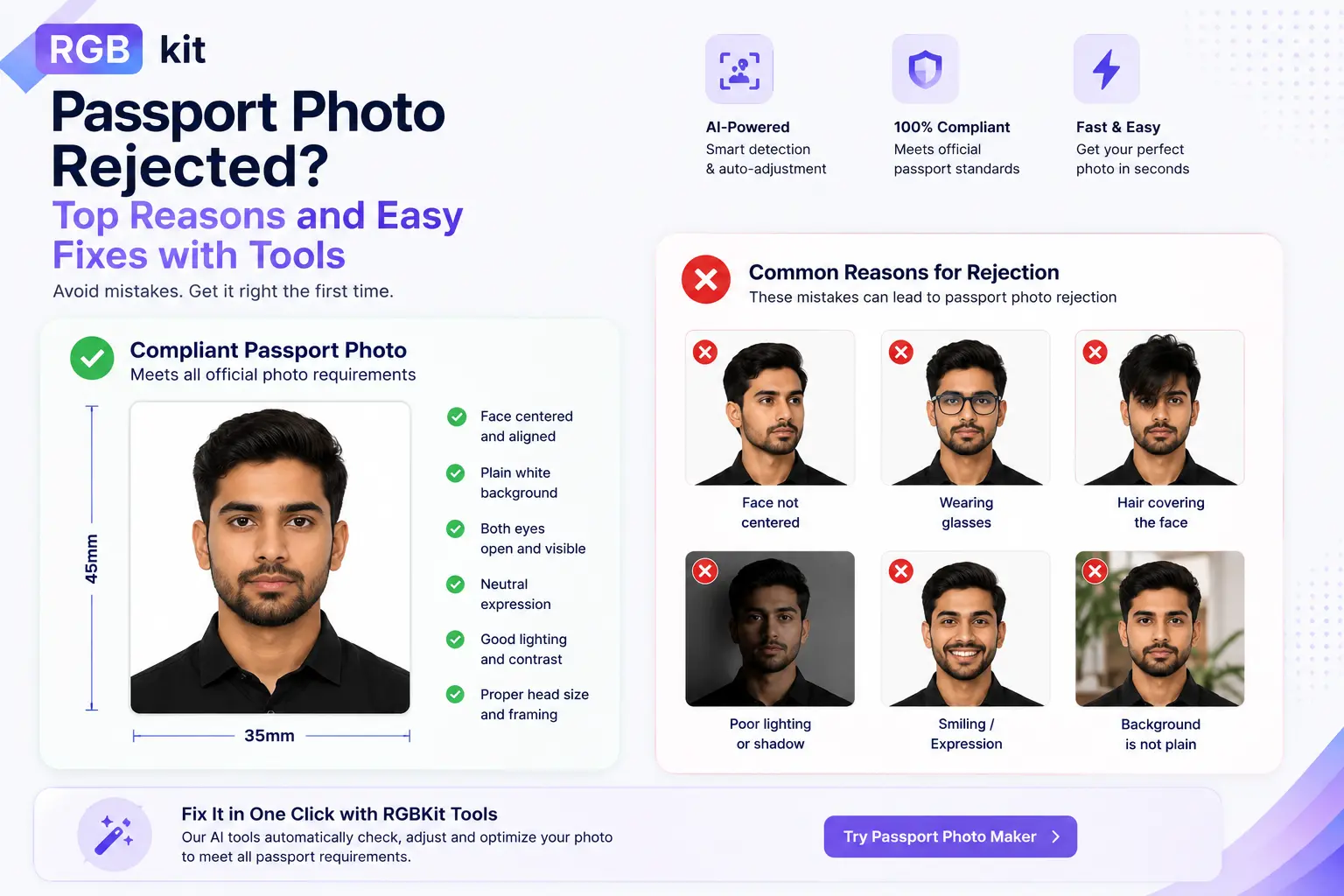
- Neutral Facial Expression
Your face should remain neutral with both eyes open and clearly visible. Smiling too much or tilting your head may cause rejection.
- Proper Lighting
The photo should be evenly lit with no harsh shadows on the face or background.
- High Image Quality
Blurry or pixelated images are not accepted. Most governments now recommend high-resolution photos with proper contrast and clarity.
- Correct Face Positioning
Your face should occupy approximately 70–80% of the image area.
- Recent Photograph
The image should usually be taken within the last six months.
- No Heavy Editing
Do not apply beauty filters, AI face enhancements, or excessive retouching. Basic cropping and background correction are generally acceptable.
Passport Photo Background Rules You Must Follow
One of the most common reasons for rejection is an incorrect background.
Current passport photo background rules typically include:
- Plain white or off-white background
- No patterns or textures
- No shadows behind the head
- No objects or people visible in the background
Modern passport size photo maker tools can automatically remove backgrounds and replace them with compliant white backgrounds. RGBKit’s AI-powered editing tools help users quickly achieve professional-looking results without advanced editing skills.
How to Create Passport Photo Online
Creating a passport photo at home has become incredibly simple. Here’s a step-by-step process you can follow.
Step 1: Take a Clear Photo
Use a smartphone or digital camera in a well-lit area. Stand against a plain wall with natural lighting if possible.
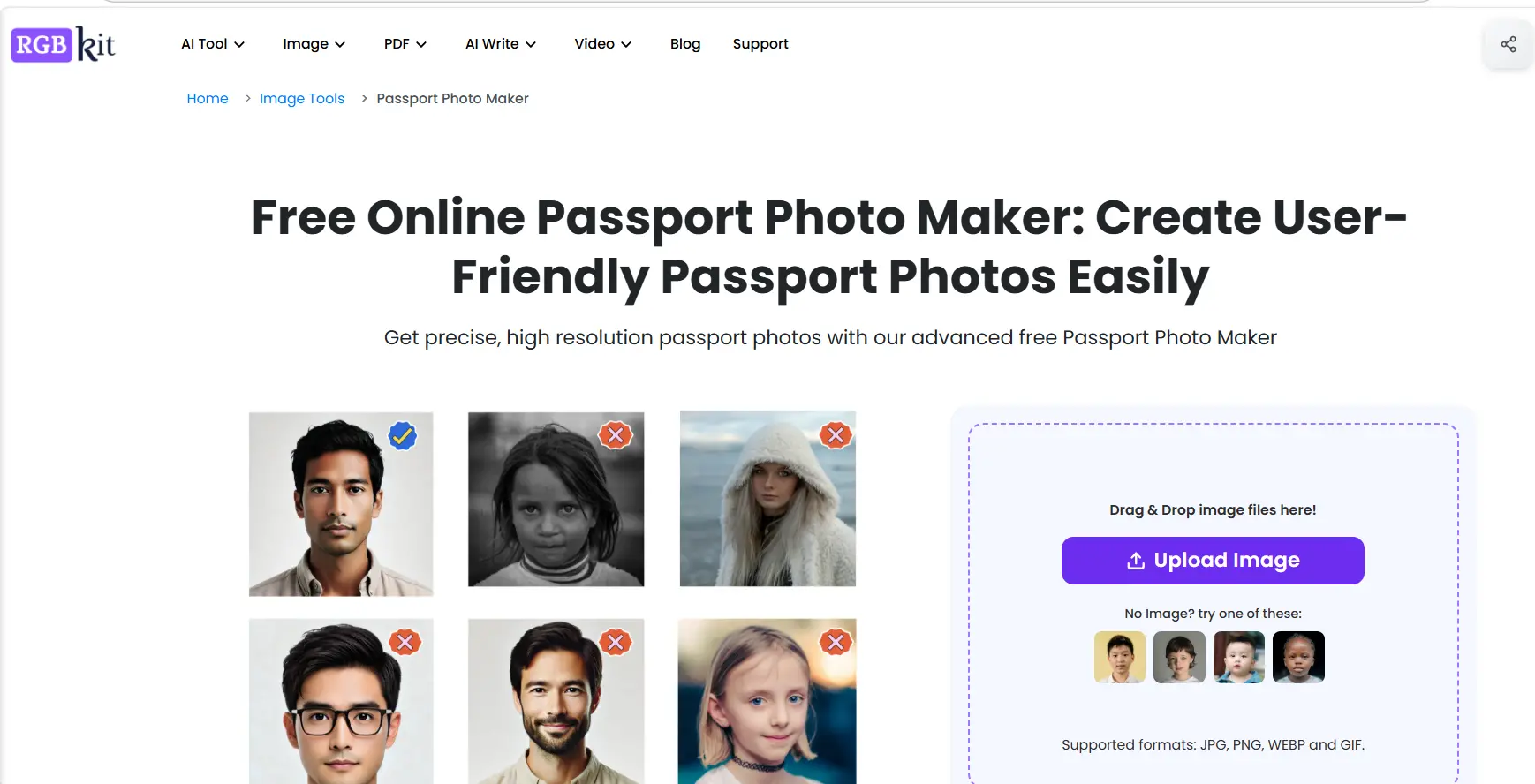
Step 2: Upload the Image
Visit RGBKit Passport Photo Maker and upload your image.
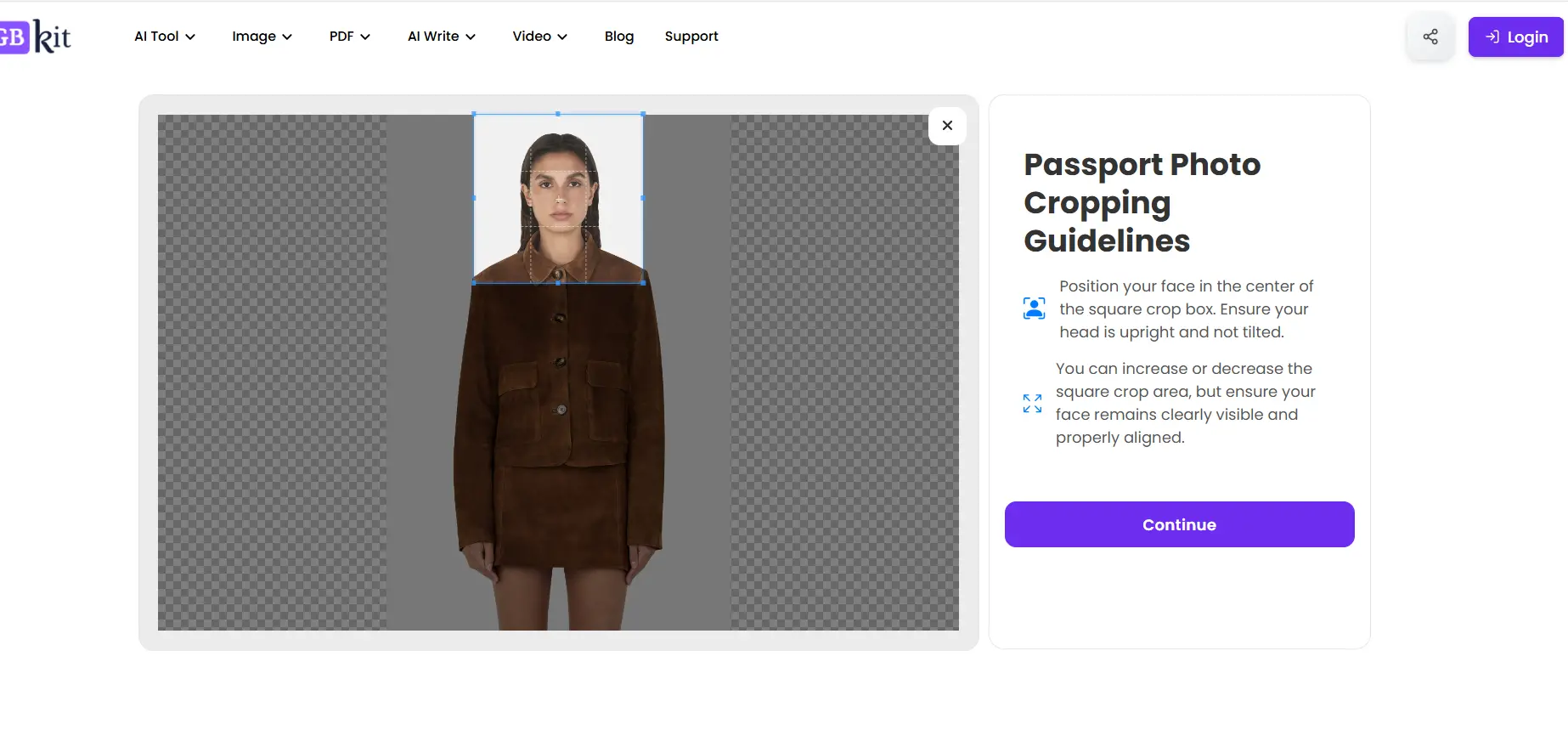
Step 3: Adjust the Passport Size Photo Dimensions
The tool automatically crops and aligns your image according to official dimensions of a passport photo.

Step 4: Choose your Requirements
Use AI background removal to create a clean white background that follows passport photo background rules. Select single/multiple options and size of the passport size photograph.

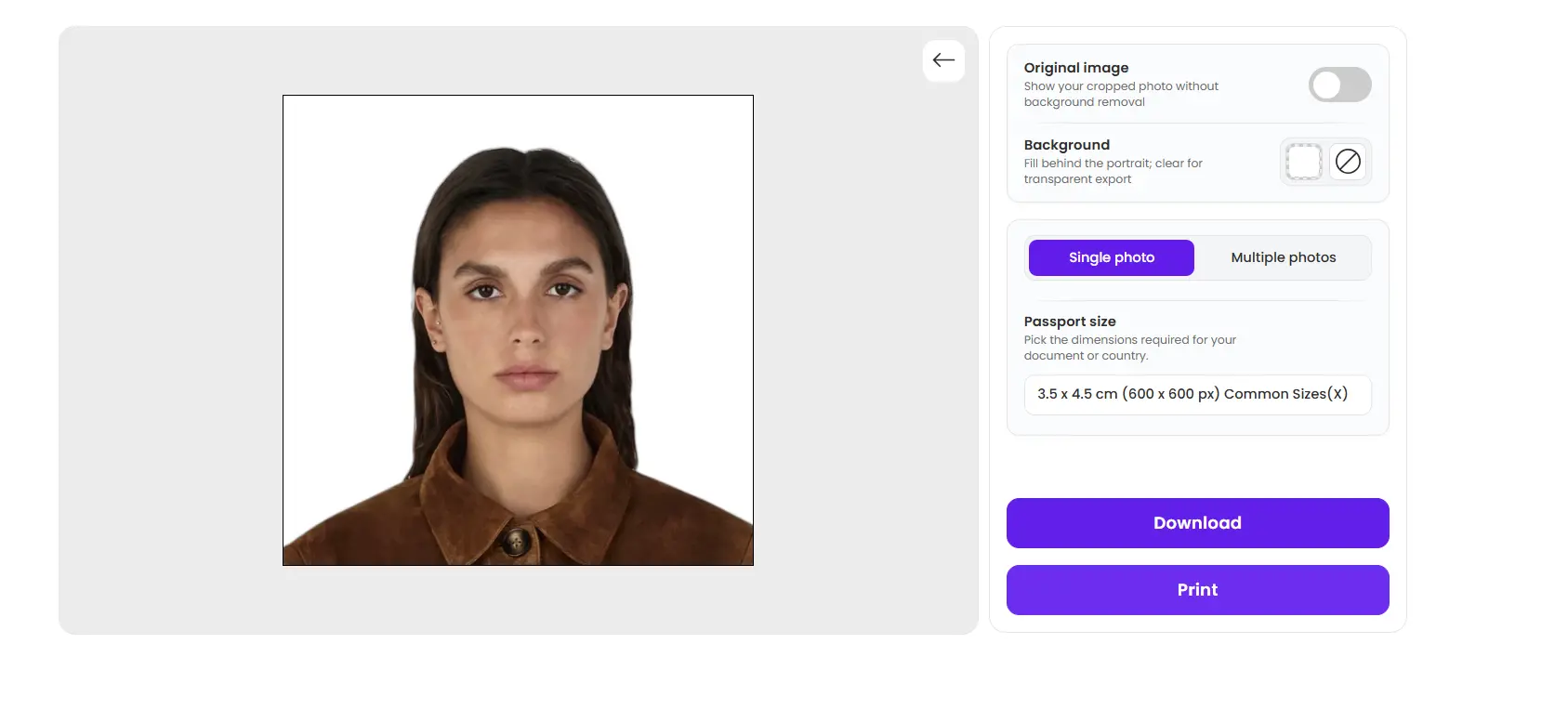
Step 5: Download and Print
Download the final image in high resolution for digital upload or printing.
Benefits of Using an Online Passport Size Photo Maker
There are several reasons why people now prefer to create passport photo online instead of visiting traditional studios.
Saves Time: No appointments or waiting lines.
Cost Effective: Most online tools are free or significantly cheaper than professional studios.
Easy to Use: AI tools automatically resize, crop, and adjust photos according to official standards.
Mobile Friendly: You can create passport photos directly from your smartphone. RGBKit supports both desktop and mobile devices.
Better Privacy: Some modern tools process photos directly in your browser without storing your images online.
Tips for Getting the Perfect Passport Photo
If you want the perfect passport photo, follow these practical tips:
- Wear solid-colored clothing
- Avoid white shirts if the background is white
- Keep hair away from your eyes
- Remove sunglasses and hats
- Use soft natural lighting
- Maintain a neutral expression
- Double-check passport size photo dimensions before submission
A little preparation can help avoid delays in your passport application.
Conclusion
Meeting passport photo requirements in 2026 is easier than ever thanks to AI-powered online tools. Instead of visiting a studio, you can now create passport photo online in just a few minutes while ensuring proper passport size photo dimensions and compliance with passport photo background rules.
Whether you need the correct size of passport size photograph, want to verify dimensions of a passport photo, or simply need a fast and affordable passport size photo maker, tools like RGBKit Passport Photo Maker make the process quick, accurate, and convenient.
Frequently Asked Questions (FAQs)
What is the standard passport size picture dimension in 2026?
The most common passport size photo dimensions are 35 mm x 45 mm for many countries and 2 x 2 inches for the United States.
Can I create passport photo online for free?
Yes, several online tools allow users to create passport photo online for free, including AI-based editors that resize and adjust images automatically.
What background is required for a passport photo?
Most countries require a plain white or off-white background with no shadows or patterns.
Can I take a passport photo with my phone?
Yes, modern smartphone cameras are usually sufficient as long as the image is clear, properly lit, and follows passport photo requirements.
How recent should my passport photo be?
Most passport authorities require photos taken within the last six months.
Why do passport photos get rejected?
Common reasons include incorrect passport size photo dimensions, poor lighting, facial shadows, edited images, or background issues.
Is an online passport size photo maker reliable?
Yes, many AI-powered passport size photo maker tools now automatically adjust dimensions, crop photos correctly, and improve compliance with official standards.
Can I wear glasses in a passport photo?
In most cases, glasses are discouraged unless medically necessary, as reflections and glare may interfere with biometric verification.