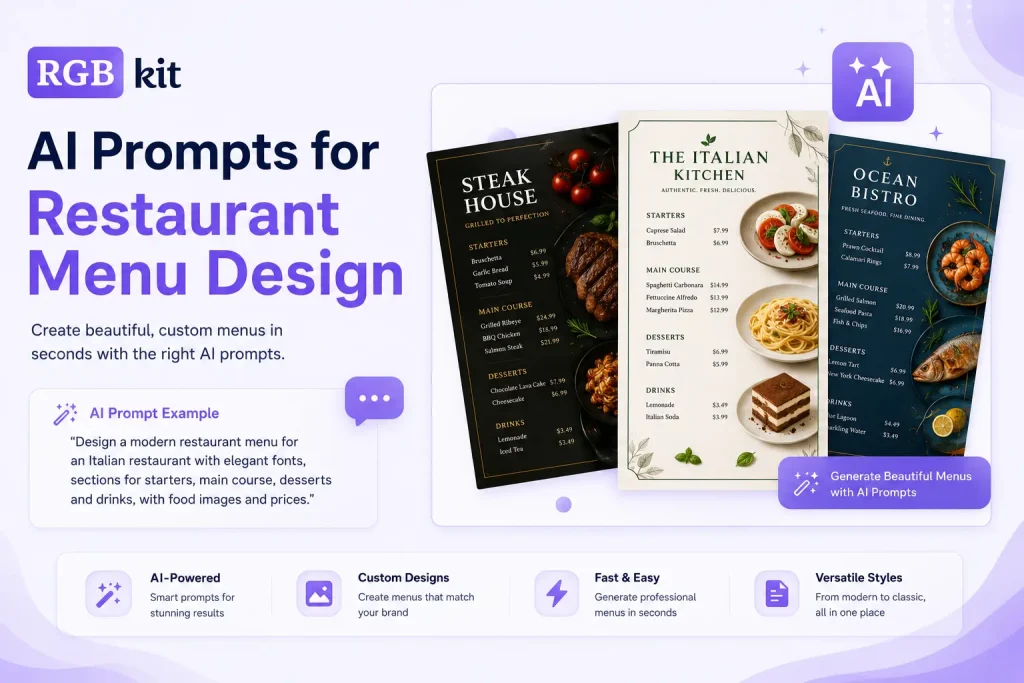
Your food looks incredible. Your menu doesn’t.
That’s the gap most restaurant owners, café managers, and food truck operators run into. The dishes are perfected, the recipes are dialed in, but the menu — the first thing a customer actually judges you on — looks like it was thrown together in a word processor. Hiring a designer costs hundreds of dollars and takes days. Doing it yourself means fighting with layout software you’ve never opened.
There’s a faster way. You describe the menu you want in plain language, and an AI image generator turns that description into a finished, print-ready design in seconds.
The trick is knowing how to describe it. A vague request like “make a restaurant menu” gives you a vague result. A detailed, well-structured prompt gives you something you’d actually be proud to hand a customer.
This guide gives you six ready-to-use prompts — for fine dining, Indian, Italian, Japanese sushi, seafood, and bakery menus. Each one comes in two versions: a fill-in-the-blank template you can adapt to any restaurant, and a complete worked example you can paste in right now. You’ll generate all of them with RGBKit’s free AI Image Generator — no signup, no design skills, no software to install.
What Makes a Good Restaurant Menu Prompt
A good prompt tells the AI exactly what you want. The more specific you are, the closer the result matches what’s in your head.
Every strong menu prompt should include five things:
-
Cuisine or restaurant type — Italian, Indian, sushi, seafood, bakery, café
-
Design style — modern, rustic, elegant, vintage, minimalist
-
Background and colors — the base texture, brand colors, and any accents like gold foil
-
Layout — portrait A4, vertical, single-page, sections stacked or side-by-side
-
Content — the actual sections, dish names, short descriptions, and prices
Skip any of these and the AI fills the gap with a guess. Include all five and you get a menu that looks intentional. The prompts below already follow this structure, so you mostly just swap in your own details.
How to Use These Prompts in RGBKit
Generating a menu takes three steps.
Step 1 — Open the tool. Go to the RGBKit AI Image Generator. It runs in your browser, so there’s nothing to download.
Step 2 — Paste and customize your prompt. Copy one of the prompts below into the prompt box. Replace the dish names, prices, colors, and restaurant details with your own.
Step 3 — Generate and download. Click Generate, wait a few seconds, and download your high-resolution menu. Not quite right? Tweak a word or two and generate again — there’s no limit to how many versions you try.
That’s the whole workflow. Now let’s get to the prompts.
6 AI Prompts for Restaurant Menus
Each prompt has two parts. The template uses {placeholders} so you can drop in any restaurant’s details. The example is a finished, ready-to-run prompt you can copy exactly as-is.
1. Fine Dining Menu Prompt
Best for upscale restaurants that want an elegant, editorial look with premium typography.
Template:
Create a premium fine dining restaurant menu for {cuisine} cuisine in a portrait A4 layout. Elegant editorial design with a luxurious {background} background featuring subtle textures, gold foil accents, thin ornamental borders, and refined {landmark/theme} inspired decorative elements. Showcase gourmet food photography featuring {chef/food}. Use premium serif typography, balanced spacing, and a sophisticated luxury restaurant aesthetic.
Display the menu with four clearly separated sections:
{section_1}
• {dish_1}
• {dish_2}
{section_2}
• {dish_3}
{section_3}
• {dish_4}
• {dish_5}
• {dish_6}
{section_4}
• {dish_7}
• {dish_8}
Each dish should include a short elegant description and a neatly right-aligned price. Professional print-ready menu, realistic typography, ultra-detailed, photorealistic, cinematic lighting, 8K.
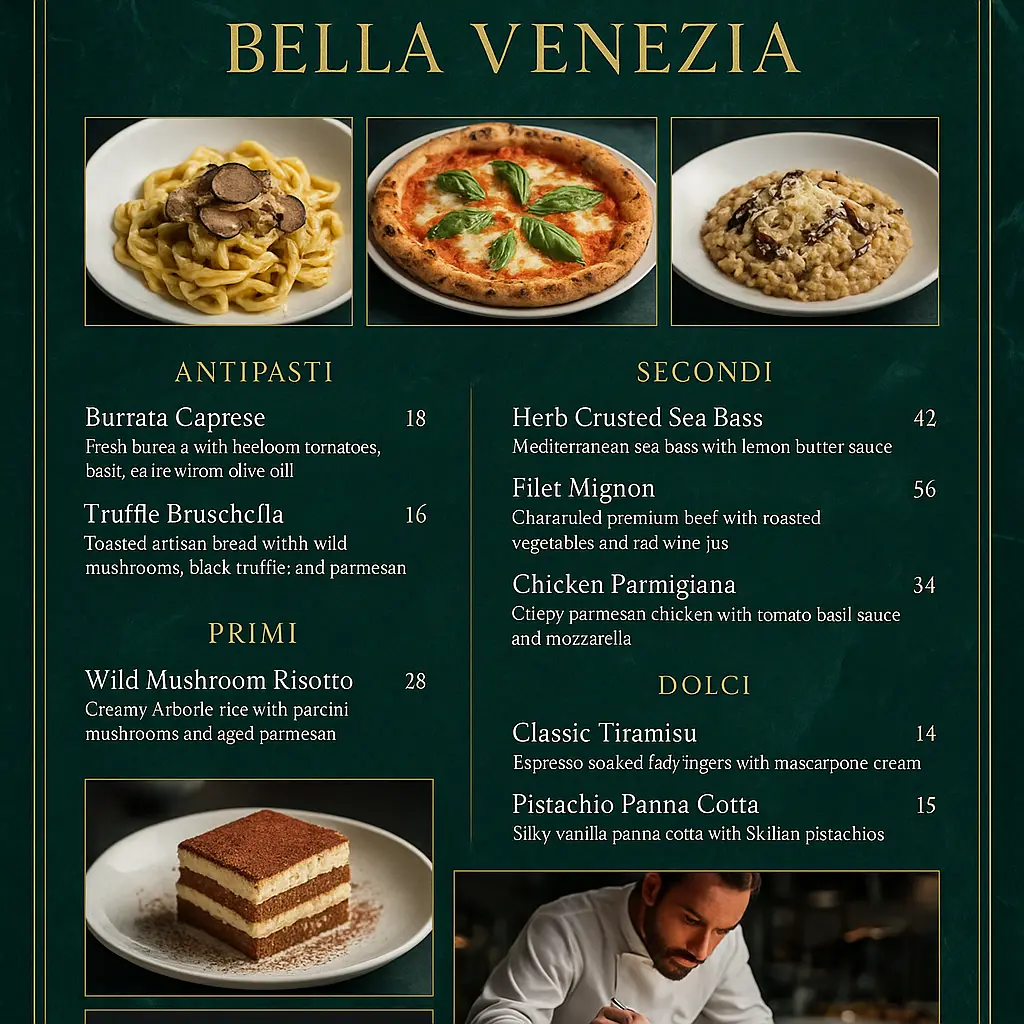
Example (ready to paste):
Create a premium fine dining restaurant menu for Italian cuisine in a portrait A4 layout. Elegant editorial design with a luxurious emerald green marble background
featuring subtle textures, gold foil accents, thin ornamental borders, and refined Venice-inspired decorative elements. Showcase gourmet food photography featuring
handmade truffle pasta, wood-fired pizza, creamy risotto, tiramisu, and an executive chef plating gourmet dishes. Use premium serif typography, balanced spacing,
and a sophisticated luxury restaurant aesthetic.

Display the menu with four clearly separated sections:

Antipasti
• Burrata Caprese
• Truffle Bruschetta

Primi
• Wild Mushroom Risotto

Secondi
• Herb Crusted Sea Bass
• Filet Mignon
• Chicken Parmigiana

Dolci
• Classic Tiramisu
• Pistachio Panna Cotta

Each dish should include a short elegant description and a neatly right-aligned price. Professional print-ready menu, realistic typography, ultra-detailed,
photorealistic, cinematic lighting, 8K.
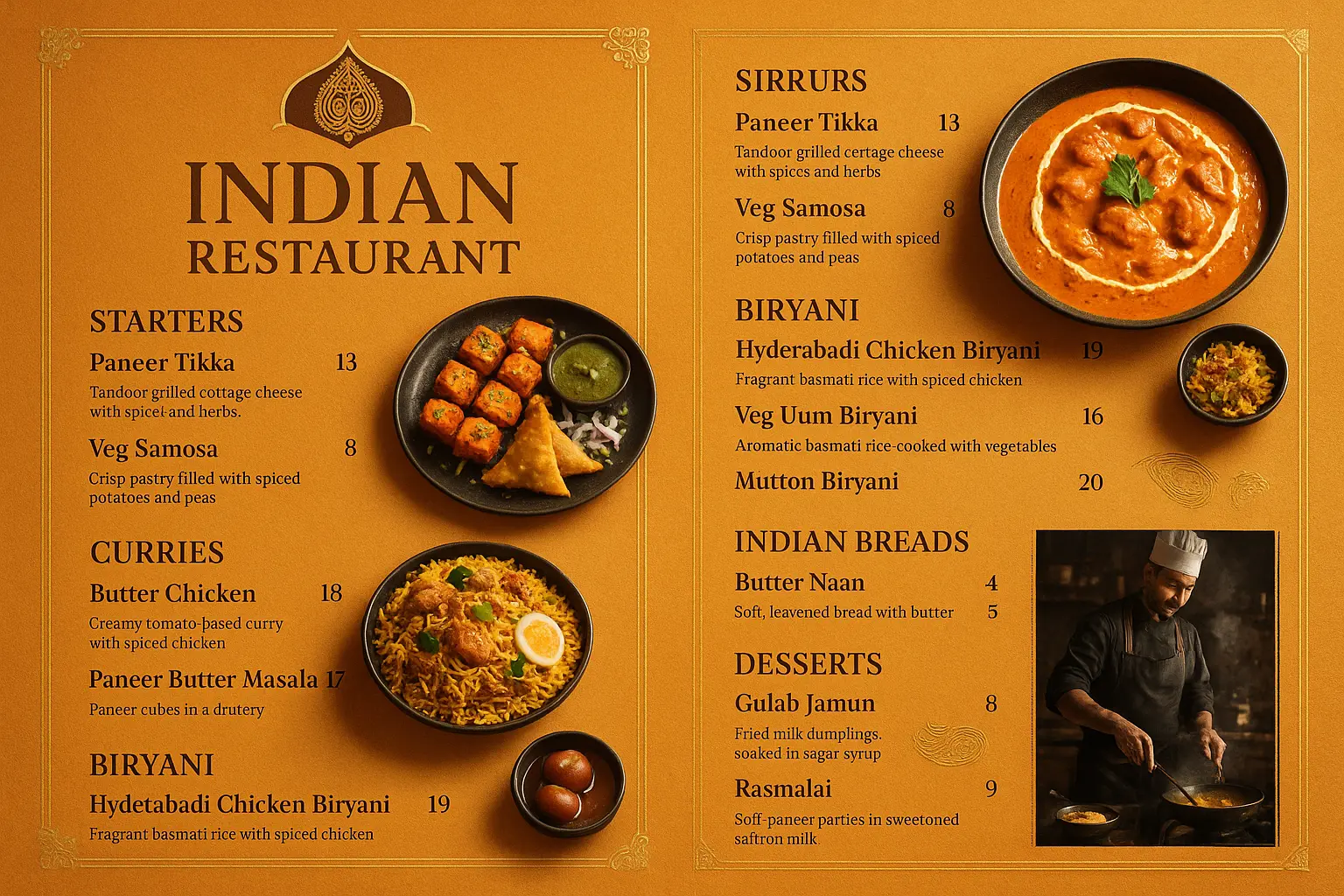
2. Indian Restaurant Menu Prompt
Best for full-service Indian restaurants with lots of sections — starters, curries, biryani, breads, desserts, and drinks.
Template:
Create a high-resolution {cuisine} restaurant menu in a portrait A4 layout. Elegant editorial design with a luxurious {background} background featuring subtle textures, {accent} accents, thin ornamental borders, and refined {landmark/theme} inspired decorative elements. Showcase realistic gourmet food photography featuring {featured_food}. Use decorative {font_style} typography, balanced spacing, and a premium restaurant aesthetic.

Display the menu with six clearly separated sections:

{section_1}
• {dish_1}
• {dish_2}
• {dish_3}

{section_2}
• {dish_4}
• {dish_5}
• {dish_6}

{section_3}
• {dish_7}
• {dish_8}
• {dish_9}

{section_4}
• {dish_10}
• {dish_11}

{section_5}
• {dish_12}
• {dish_13}

{section_6}
• {dish_14}
• {dish_15}

Each dish should include a short elegant description and a neatly right-aligned price. Professional print-ready menu, realistic typography, ultra-detailed, photorealistic, cinematic lighting, 8K.
Example (ready to paste):
Create a high-resolution Indian restaurant menu in a portrait A4 layout. Elegant editorial design with a luxurious warm saffron-orange textured background featuring subtle textures, gold foil accents, thin ornamental borders, and refined Mughal-inspired arch and paisley decorative elements. Showcase realistic gourmet food photography featuring Paneer Tikka, Butter Chicken, Dum Biryani, Gulab Jamun, Mango Lassi, and an expert chef preparing authentic Indian cuisine. Use decorative serif typography, balanced spacing, and a premium restaurant aesthetic.

Display the menu with six clearly separated sections:

Starters
• Paneer Tikka
• Veg Samosa
• Chicken Tikka

Curries
• Butter Chicken
• Dal Makhani
• Paneer Butter Masala

Biryani
• Hyderabadi Chicken Biryani
• Veg Dum Biryani
• Mutton Biryani

Indian Breads
• Butter Naan
• Garlic Naan

Desserts
• Gulab Jamun
• Rasmalai

Beverages
• Mango Lassi
• Masala Chai

Each dish should include a short elegant description and a neatly right-aligned price. Professional print-ready menu, realistic typography, ultra-detailed, photorealistic, cinematic lighting, 8K.
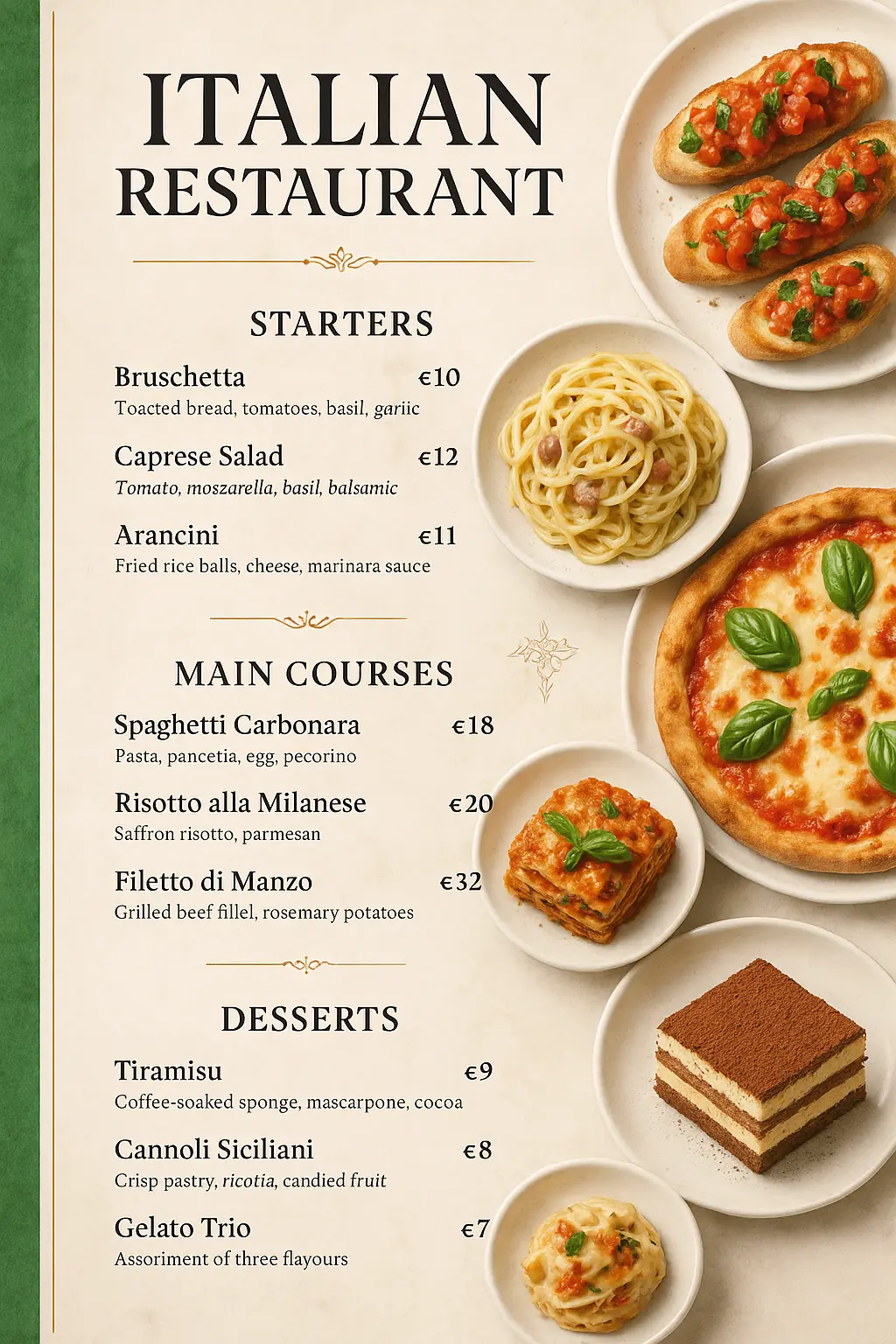
3. Italian Restaurant Menu Prompt (Vertical Layout)
Best when you want food photography running down one side and the menu text down the other.
Template:
Create a high-resolution {cuisine} restaurant menu with a vertical layout and a {background_style}. Display realistic gourmet images of {food_1}, {food_2}, {food_3}, {food_4}, and {food_5} arranged elegantly along one side. Use decorative {font_style} typography with premium editorial styling and balanced spacing.

Display the menu with three clearly separated sections:

{section_1}
• {dish_1} — {price_1}
• {dish_2} — {price_2}
• {dish_3} — {price_3}

{section_2}
• {dish_4} — {price_4}
• {dish_5} — {price_5}
• {dish_6} — {price_6}

{section_3}
• {dish_7} — {price_7}
• {dish_8} — {price_8}
• {dish_9} — {price_9}

Include short elegant descriptions for every dish, neatly right-aligned {currency} prices, subtle {theme} decorative elements, thin ornamental dividers, realistic typography, and a luxurious print-ready restaurant menu design. Ultra-detailed, photorealistic, cinematic lighting, 8K.
Example (ready to paste):
Create a high-resolution Italian restaurant menu with a vertical layout and an elegant cream marble background featuring subtle Italian flag accents along the left edge. Display realistic gourmet images of Spaghetti Carbonara, Margherita Pizza, Lasagna, Bruschetta, and Tiramisu arranged elegantly along one side. Use decorative classic serif typography with premium editorial styling and balanced spacing.

Display the menu with three clearly separated sections:

Starters
• Bruschetta — €10
• Caprese Salad — €12
• Arancini — €11

Main Courses
• Spaghetti Carbonara — €18
• Risotto alla Milanese — €20
• Filetto di Manzo — €32

Desserts
• Tiramisu — €9
• Cannoli Siciliani — €8
• Gelato Trio — €7

Include short elegant descriptions for every dish, neatly right-aligned euro prices, subtle Venice-inspired decorative elements, thin gold ornamental dividers, realistic typography, and a luxurious print-ready restaurant menu design. Ultra-detailed, photorealistic, cinematic lighting, 8K.
4. Japanese Sushi Menu Prompt
Best for a clean, modern sushi bar look with bold brush-style titles and Japanese accents.
Template:
Create a high-resolution {cuisine} menu with a {background_style} background, bold {title_style} typography, and {accent_color} accents. Display realistic gourmet images of {food_1} and {food_2} served with {props}. Use a clean, modern editorial layout with balanced spacing.

Display the menu with two clearly separated sections:

{section_1}
• {dish_1} — {price_1}
• {dish_2} — {price_2}
• {dish_3} — {price_3}

{section_2}
• {dish_4} — {price_4}
• {dish_5} — {price_5}
• {dish_6} — {price_6}

Include short elegant descriptions for every sushi roll, neatly right-aligned {currency} prices, subtle {theme} decorative elements, realistic food photography, clean typography, and a premium modern print-ready menu design. Ultra-detailed, photorealistic, cinematic lighting, 8K.
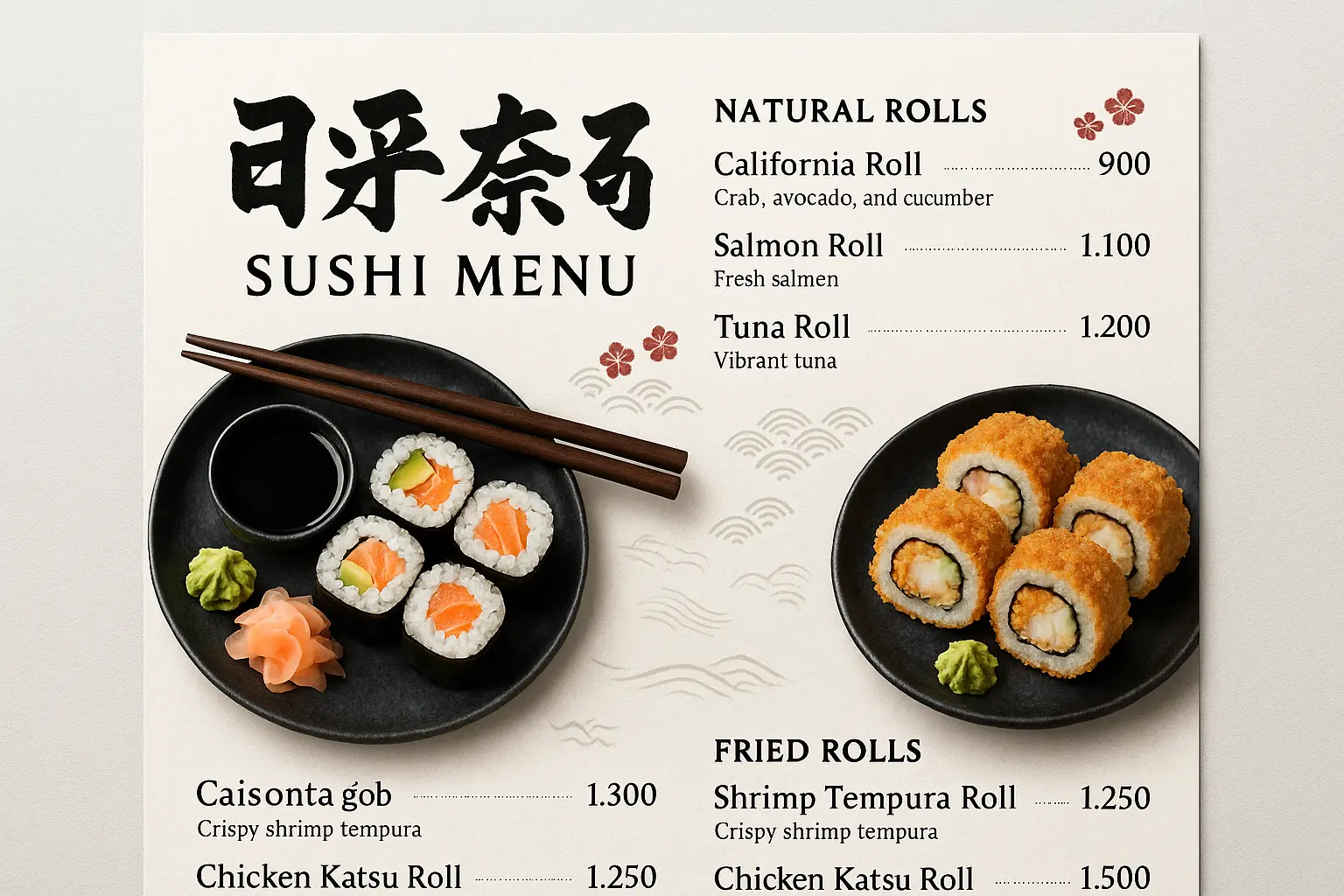
Example (ready to paste):
Create a high-resolution Japanese sushi menu with a white textured rice paper background, bold brush-style Japanese title typography, and deep red Japanese accents. Display realistic gourmet images of California Rolls and Shrimp Tempura Rolls served with chopsticks, soy sauce, pickled ginger, and wasabi. Use a clean, modern editorial layout with balanced spacing.

Display the menu with two clearly separated sections:

Natural Rolls
• California Roll — ¥900
• Salmon Roll — ¥1,100
• Tuna Roll — ¥1,200

Fried Rolls
• Shrimp Tempura Roll — ¥1,300
• Chicken Katsu Roll — ¥1,250
• Eel Roll — ¥1,500

Include short elegant descriptions for every sushi roll, neatly right-aligned yen prices, subtle cherry blossom and traditional Japanese wave decorative elements, realistic food photography, clean typography, and a premium modern print-ready menu design. Ultra-detailed, photorealistic, cinematic lighting, 8K.
5. Seafood Restaurant Menu Prompt
Best for a coastal, fresh-catch feel with a hero dish in the center and seafood framing the edges.
Template:
Create a high-resolution {restaurant_type} menu with a {background_style} background and realistic gourmet images of {food_item_1}, {food_item_2}, {food_item_3}, {food_item_4}, {food_item_5}, and {food_item_6} arranged elegantly around the edges. Place a large realistic {featured_food} vertically in the center as the focal point. Use {heading_style} typography with a clean editorial layout and balanced spacing.

Display the menu with six clearly separated sections:

{section_1}
• {dish_1} — {price_1}
• {dish_2} — {price_2}

{section_2}
• {dish_3} — {price_3}
• {dish_4} — {price_4}

{section_3}
• {dish_5} — {price_5}
• {dish_6} — {price_6}

{section_4}
• {dish_7} — {price_7}
• {dish_8} — {price_8}

{section_5}
• {dish_9} — {price_9}
• {dish_10} — {price_10}

{section_6}
• {dish_11} — {price_11}
• {dish_12} — {price_12}

Include short appetizing descriptions for every dish, neatly right-aligned {currency} prices, subtle {theme} decorative elements, realistic seafood photography, thin ornamental dividers, and a fresh premium print-ready menu design. Ultra-detailed, photorealistic, cinematic lighting, 8K.
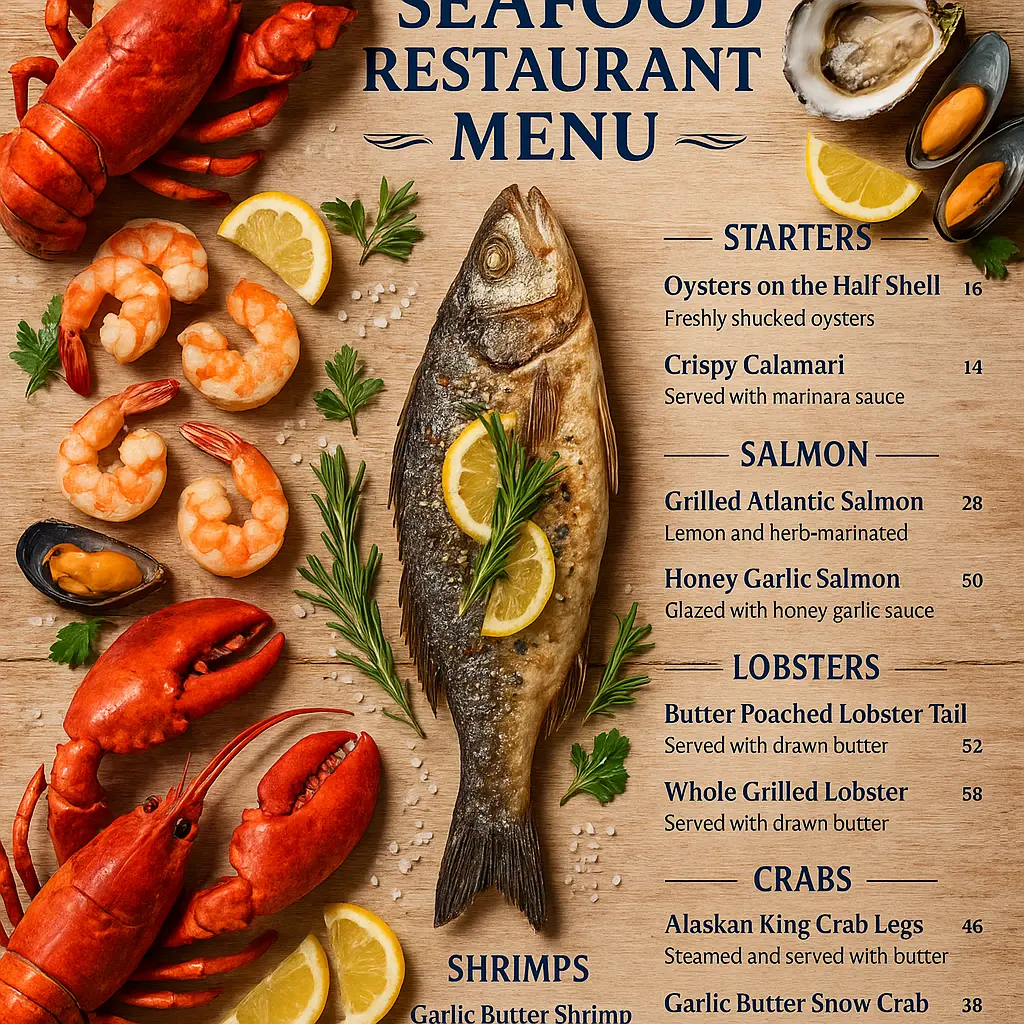
Example (ready to paste):
Create a high-resolution seafood restaurant menu with a weathered light oak wood background and realistic gourmet images of lobster, shrimp, crab, oysters, mussels, and lemon wedges arranged elegantly around the edges. Place a whole grilled sea bass vertically in the center as the focal point, garnished with fresh herbs, rosemary, parsley, lemon slices, and coarse sea salt. Use bold navy blue headings with a clean editorial layout and balanced spacing.

Display the menu with six clearly separated sections:

Starters
• Oysters on the Half Shell — $16
• Crispy Calamari — $14

Salmon
• Grilled Atlantic Salmon — $28
• Honey Garlic Salmon — $30

Lobsters
• Butter Poached Lobster Tail — $42
• Whole Grilled Lobster — $58

Crabs
• Alaskan King Crab Legs — $46
• Garlic Butter Snow Crab — $38

Shrimps
• Garlic Butter Shrimp — $24
• Cajun Grilled Prawns — $26

Drinks
• Fresh Lemonade — $6
• Sparkling Mineral Water — $5

Include short appetizing descriptions for every dish, neatly right-aligned dollar prices, subtle ocean wave and seashell decorative elements, realistic seafood photography, thin nautical ornamental dividers, and a fresh premium coastal print-ready menu design. Ultra-detailed, photorealistic, cinematic lighting, 8K.
6. Bakery & Dessert Menu Prompt
Best for bakeries, dessert shops, and cafés that want a soft, decorative, vintage feel.
Template:
Create a high-resolution {bakery_type} menu with a {background_style} background, {decorative_elements}, and realistic gourmet images of {dessert_1}, {dessert_2}, {dessert_3}, {dessert_4}, and {dessert_5} arranged elegantly around the menu. Use decorative {font_style} typography with a premium editorial layout and balanced spacing.

Display the menu with five clearly separated sections:

{section_1}
• {dish_1} — {currency}{price_1}
• {dish_2} — {currency}{price_2}
• {dish_3} — {currency}{price_3}

{section_2}
• {dish_4} — {currency}{price_4}
• {dish_5} — {currency}{price_5}

{section_3}
• {dish_6} — {currency}{price_6}
• {dish_7} — {currency}{price_7}

{section_4}
• {dish_8} — {currency}{price_8}
• {dish_9} — {currency}{price_9}

{section_5}
• {dish_10} — {currency}{price_10}
• {dish_11} — {currency}{price_11}

Include short delicious descriptions for every dessert, neatly right-aligned prices using the {currency} symbol, subtle {theme} decorative elements, realistic bakery photography, thin ornamental dividers, and a luxurious print-ready bakery menu design. Ultra-detailed, photorealistic, cinematic lighting, 8K.
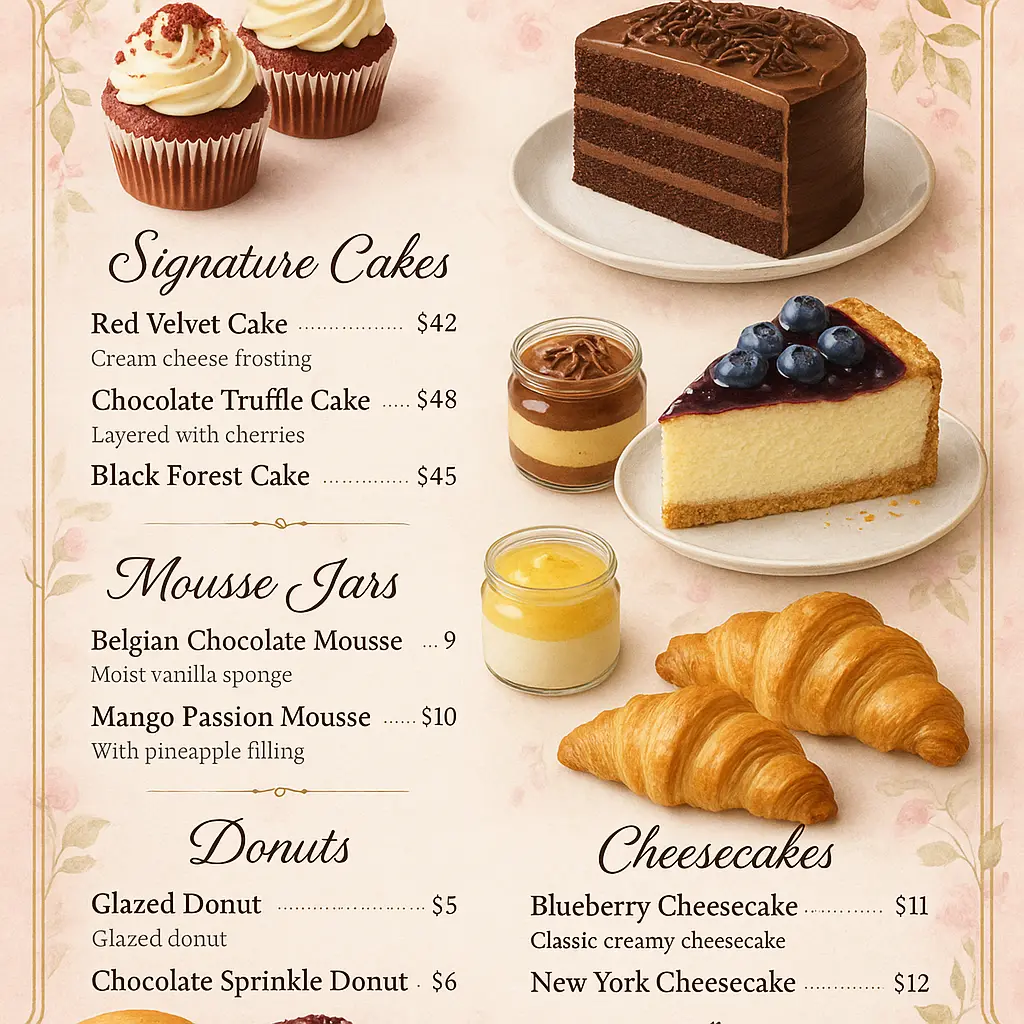
Example (ready to paste):
Create a high-resolution bakery and dessert menu with a soft pastel pink watercolor background, delicate floral borders, elegant vintage styling, and subtle gold accents. Display realistic gourmet images of red velvet cupcakes, chocolate layer cake, blueberry cheesecake, chocolate mousse jars, glazed donuts, and buttery croissants arranged elegantly around the menu. Use elegant handwritten script headings with a premium editorial layout and balanced spacing.

Display the menu with five clearly separated sections:

Signature Cakes
• Red Velvet Cake — $42
• Chocolate Truffle Cake — $48
• Black Forest Cake — $45

Half Pound Cakes
• Vanilla Fresh Cream Cake — $24
• Pineapple Cake — $22

Mousse Jars
• Belgian Chocolate Mousse — $9
• Mango Passion Mousse — $10

Donuts
• Glazed Donut — $5
• Chocolate Sprinkle Donut — $6

Cheesecakes
• Blueberry Cheesecake — $11
• New York Cheesecake — $12

Include short delicious descriptions for every dessert, neatly right-aligned prices using the "$" symbol, subtle floral and ribbon decorative elements, realistic bakery photography, thin ornamental dividers, and a luxurious premium print-ready bakery menu design. Ultra-detailed, photorealistic, cinematic lighting, 8K.
Tips for Getting Better Results
Small changes to your prompt make a big difference in the final design.
-
Name your dishes and prices exactly. Don’t leave placeholders in when you generate. The AI lays out real text far better than generic labels.
-
Stick to one design theme. Pick rustic or modern or vintage — mixing three styles in one prompt confuses the result.
-
Add your brand colors. Swap the background and accent colors to match your logo so the menu feels like yours, not a template.
-
Keep sections balanced. Two to four items per section reads cleaner than one crowded block of twelve.
-
Generate a few versions. If the first result isn’t perfect, change one detail and regenerate. It’s free, so experiment.
Common Mistakes to Avoid
-
Being too vague. “Make a menu” gives the AI nothing to work with. Every prompt in this guide is specific for a reason — keep it that way.
-
Overcrowding the page. Cramming every item you sell onto one menu makes it hard to read. Feature your best sellers.
-
Skipping brand details. Leaving out colors, fonts, or theme means the AI picks for you — and it rarely matches your restaurant.
-
Choosing fonts that look nice but can’t be read. Decorative headings are fine; keep dish names and prices clean and legible.
-
Forgetting to proofread. AI-generated text can occasionally misspell a dish. Always read the final image before printing.
Frequently Asked Questions
Do I need design skills to use these prompts?
No. If you can copy, paste, and swap in your dish names, you can create a menu. The RGBKit AI Image Generator handles all the design work.
Is the RGBKit AI Image Generator free?
Yes. It runs in your browser, requires no signup, and there’s nothing to install. Just open it and start generating.
Can I use these menus for my real restaurant?
Absolutely. The prompts are built to produce high-resolution, print-ready designs suitable for actual menus, table cards, and digital use.
What if the first menu doesn’t look right?
Tweak your prompt and generate again. Change the background color, adjust the layout, or reword a section. Since generating is free, you can try as many versions as you like until it’s right.
Can I change the layout or number of sections?
Yes. The templates use two to six sections, but you can add or remove sections and dishes to fit your menu. Just keep the structure clear so the AI knows where each section starts.
Which prompt should I start with?
Pick the one closest to your cuisine. If none match exactly, use the fine dining or Indian template — they’re the most flexible and easy to adapt to any restaurant type.
Final Thoughts
A great menu doesn’t have to cost hundreds of dollars or take days to design. With a clear, detailed prompt and the right tool, you can go from a blank page to a polished, print-ready menu in minutes.
Copy any prompt above, swap in your own dishes and prices, and let the AI do the heavy lifting. Try a few versions, pick your favorite, and you’re done.
Start creating your restaurant menu with RGBKit’s free AI Image Generator — no signup, no software, no design experience needed.